RustFox User Guide
Language / 语言:简体中文 · English
For end users. No Rust, no command-line knowledge required — download, install, double-click.
- Applies to: RustFox 0.0.x (verified on 0.0.25; per-version changes in CHANGELOG.md)
- Platforms: Windows 10/11, macOS 11+, Linux (common desktop environments)
1. Install & launch
1.1 Windows
| Method | Steps |
|---|---|
| Installer (recommended) | Download RustFox-<version>-setup.exe → double-click → follow the prompts → a RustFox shortcut appears on the desktop and a "RustFox" group in the Start menu |
If Windows SmartScreen says "Windows protected your PC" on first run, click "More info" → "Run anyway". The installer does not carry a code-signing certificate yet — this is expected.
1.2 macOS
Download
RustFox-<version>-<arch>.dmg(aarch64for Apple Silicon,x64for Intel)Mount it and drag RustFox.app into Applications
First launch: right-click RustFox.app → Open, or System Settings → Privacy & Security → Open Anyway. The app is ad-hoc signed but not notarized (no paid Apple Developer certificate), so Gatekeeper will say the developer can't be verified — that's normal and not a broken app
If you see "RustFox is damaged and can't be opened" (a leftover of the old unsigned installers), run this in Terminal once, then try again:
xattr -cr /Applications/RustFox.app
Afterwards launch from Launchpad or Applications, or pin it to the Dock.
In-app auto update ("About → Check for Updates") is unaffected: after the updater replaces the app, the quarantine flag is not re-applied.
1.3 Linux
- Download
rustfox-<version>-amd64.deb(Debian/Ubuntu) or run the.AppImagedirectly - Debian-based install:
sudo apt install ./rustfox-<version>-amd64.deb
Linux relies on the system WebKit/GTK libraries (webkit2gtk-4.1, gtk-3). If startup complains about missing
libwebkit2gtk, install the packages for your distribution.
1.4 First launch
The local database initializes automatically on first start (no network, no account) and you land on the home screen:
┌─────────────────────────────── RustFox ───────────────────────────────┐
│ RustFox │ [Project ▼] │ [No environment ▼] │  Search │ Feedback │ ⚙   │
├─────────────────────────────────────────────────────────────────────────┤
│                          🦊  Get started with RustFox                    │
│                   Create your first project and start managing APIs      │
│                          [ Create project ]                              │
└─────────────────────────────────────────────────────────────────────────┘
2. UI overview
| Area | Purpose |
|---|---|
| Top bar | Project tabs, environment selector, Mock status, docs/Mock menus, settings |
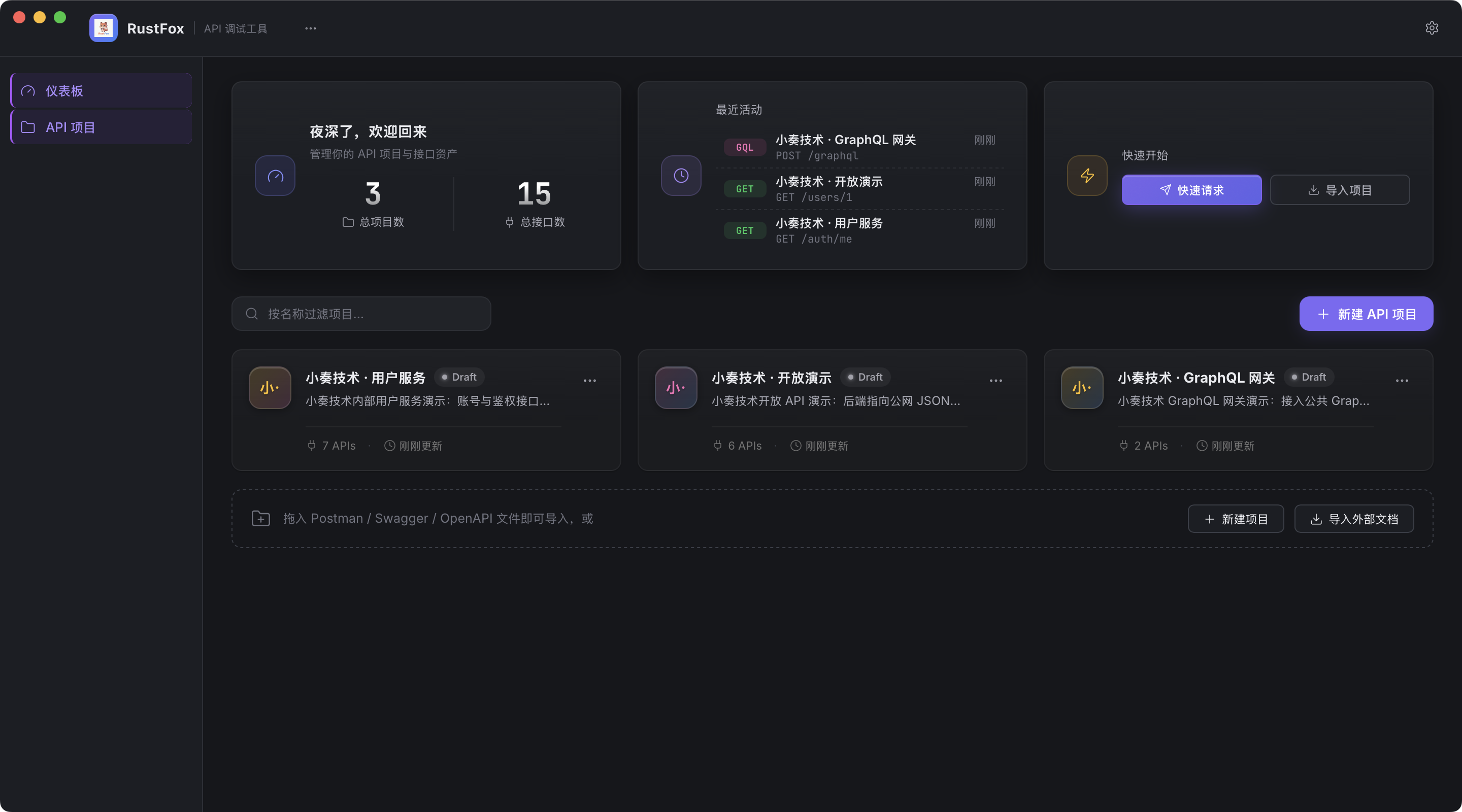
| Dashboard | Welcome & stat cards, recent activity, quick actions, project cards, drag-and-drop import |
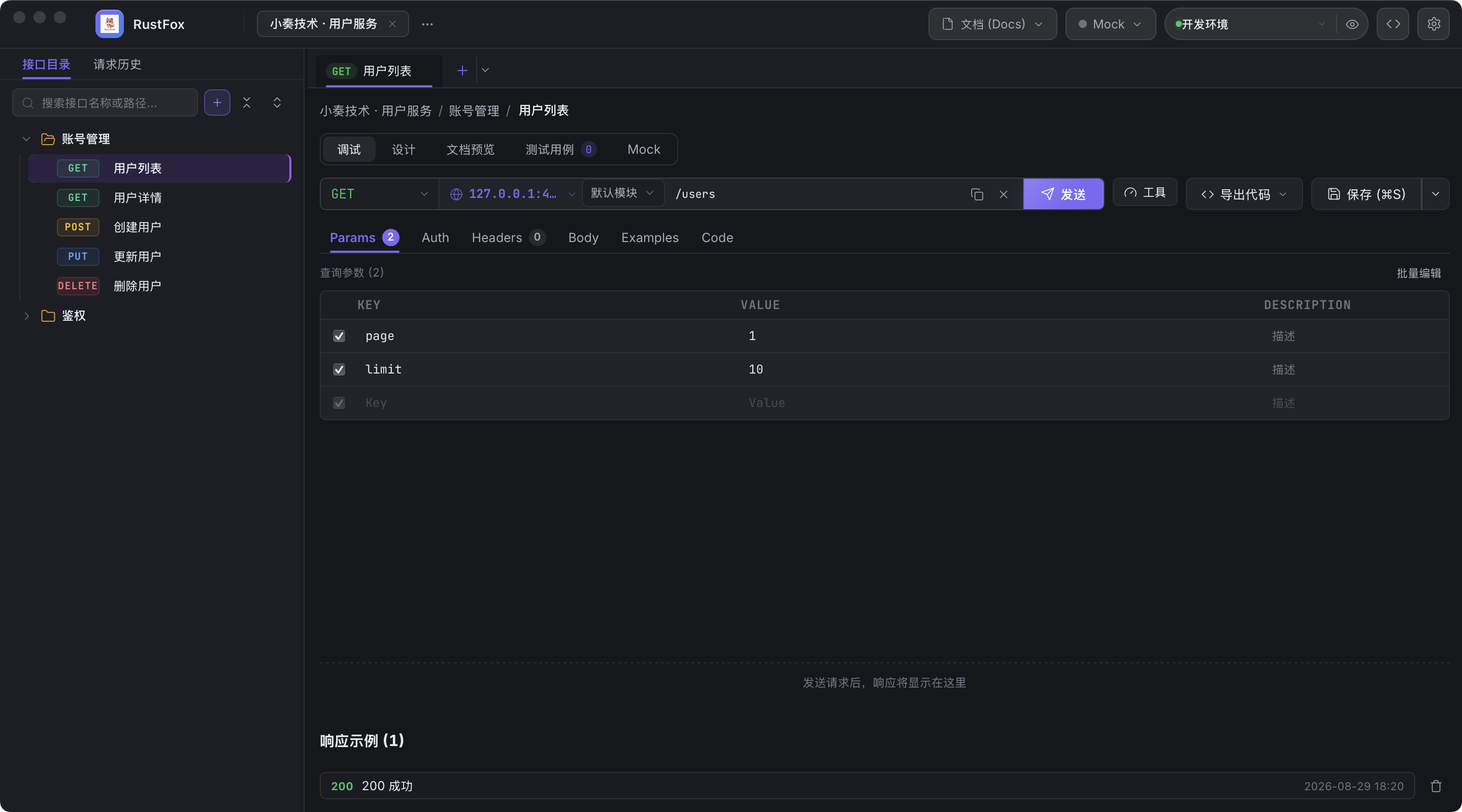
| Workspace | Sidebar tree + tab bar + endpoint editor + response panel |
| Settings | Environment variables, OpenAPI import/export, Mock server, backup & restore |
Dashboard layout:
Workspace layout:
3. Projects
- On the dashboard click "Create project", then enter a name and base URL (
base_url, e.g.https://api.example.com). - Inside a project the sidebar shows the folder tree: folders and endpoints in a hierarchy; the top bar switches projects.
- Multi-select in the tree: Ctrl/⌘-click to toggle, Shift for range select, then batch delete / batch move to a folder.
- Deleting an endpoint / folder shows an Undo action in the toast (single level, 8 seconds).
- Shortcut overview: the toolbar "keyboard" icon or Ctrl+/ opens shortcut help.
- All project data stays on your machine (see section 10); back up / restore anytime from Settings.
3.1 Teams & team sync
Projects are grouped by team (teams are plain project containers for now — no member roles yet):
- Team management: on the dashboard, "Team manage" creates / renames / deletes teams (a team with projects cannot be deleted). The create-project dialog picks or creates a team inline; the team header "New" pre-selects that team.
- Sync remote: open a project → "Team sync" to configure one git repo for the team (SSH
git@host:pathor HTTP(S)). Multiple projects in a team — and different teams — can share the same repo; snapshots live side by side asprojects/{project-id}.json. S3 / DB remotes are coming soon. - Push: sends the project's full snapshot (endpoints / environments / mock / test cases) to the team remote. Credentials are redacted automatically before pushing (tokens / passwords / API keys never leave your machine), and the filtered list is shown afterwards.
- Pull: preview the endpoint-level diff (added / removed / modified) first; nothing is overwritten until you confirm. A local snapshot is archived automatically beforehand (under
sync/backups/in the data dir) so you can roll back. Local credentials are restored after pulling. - Import new projects: the team header "Sync" on the dashboard browses all project snapshots on the remote and imports a teammate's new project as a local project in one click.
Sync is an explicit snapshot action, not real-time collaboration: local SQLite stays the single source of truth and you trigger push/pull yourself. Credentials never leave your machine (pushed redacted), and the workspace fully reloads after a pull overwrite.
4. Writing & sending requests (core)
Workspace layout:
┌─ Project tree ─┬───────────────────────────────────────────────────────┐
│ ▾ my-app      │  [Tab1 ●] [Tab2]  + New                               │
│  ▾ Users       │  [GET ▼]  https://api.example.com/users/{id}  [Save][Send]│
│    GET List    │  ┌ Params │ Headers │ Body │ Auth │ Tests │ Docs ───┐ │
│    POST Create │  │ key        value                                  │ │
└────────────────┴─┴──────────────────────────────────────────────────┴─┘
| Step | How |
|---|---|
| Open an endpoint | Click it in the sidebar → opens as a tab (clicking an open tab activates it) |
| New endpoint | The + button in the sidebar toolbar, or "New request" from a folder's ⋯ menu |
| Edit params | Params tab adds query parameters; Headers adds request headers (enable toggles whether each is sent) |
| Edit body | Body tab: none / form-data / urlencoded / raw (JSON, text…) / binary / GraphQL; JSON mode has pretty/minify/copy actions |
| Auth | Auth tab picks the scheme (None / Basic / Bearer / API Key / OAuth2 — all four OAuth2 flows: authorization code / client credentials / password / implicit; tokens attach automatically) |
| Save | Click "Save"; unsaved changes are flagged with ● on the tab title, and switching tabs never loses drafts |
Send: click "Send" — the right pane shows status, duration, size, headers and body; recent requests go into "History" (below the address bar).
Multiple tabs can edit different endpoints at once, each with its own draft; closing an unsaved tab asks first.
4.1 Variables
{{variable}} works anywhere in a request:
{{base_url}},{{token}}etc. come from the active environment- Project variables are configured in Settings → project variables
- Substitution happens automatically on send / code generation / load testing
5. Environments
Settings → "Environments" (environments are per project: edit the environments of the project you are in, isolated from other projects):
- "New environment": enter a name and variables (key/value pairs); each environment holds one base URL (supports
{{variables}}) plus global variables / global params. - Switch environments from the top bar; variables are substituted automatically on send. Precedence: environment > project.
- The active environment is remembered per project: each project tracks its own selected environment.
- ⚠️ Environment variable values are encrypted at rest (AES-256-GCM). Do not delete
master.keyin the data directory — encrypted values become undecryptable without it (plaintext can be recovered from a backup JSON).
5.1 Global proxy & cookies
- Settings can configure a global HTTP proxy (persisted, applies to all requests including load tests).
- Login cookies replay automatically: subsequent same-domain requests carry them with no manual copying.
- The sidebar "Cookies" tab lists / clears stored login state per domain; the Headers tab can disable auto-replay per request.
5.2 Environment import / export
The environment manager can export the selected environment (native RustFox JSON / Postman Environment) or import either file as a new environment (name conflicts get a suffix). Exports contain plaintext values — keep them safe.
6. Automated testing
Workspace Tests tab: attach a JSON test script to an endpoint (pre-request variables, response capture, assertions). Supports:
pre_request: inject variables before the requestextract: capture values from the response and pass them downstream (in folder order)assertions: status code / body contains / JSONPath value / response duration and more; extra opsmatches/not_matches(regex) andempty/not_empty, extra typesgraphql_errors(assert on body.errors) andlength(length of the value at path, numeric comparison)
After saving click "Run tests" and choose this endpoint / this folder / the whole project; results are stored in test history (last 20 runs, expandable and deletable).
GraphQL debugging view
Top bar → "GraphQL workbench" (route /graphql, independent of the folder tree):
- Enter the endpoint URL (
{{variables}}supported), Query, Variables and OperationName, then send. - Responses distinguish
datafromerrorsper GraphQL semantics (errorspresent means business failure and renders first). - Save the request as a tree endpoint (body mode
graphql), or generate cURL / JavaScript (fetch) code. - History lives in local browser storage (
rustfox_graphql_history), separate from request history.
Realtime debugging (WebSocket / SSE)
Top bar → realtime view (route /realtime, can be popped out into its own window to monitor while you work):
- WebSocket: connect to a
ws://URL, send text frames / Ping, auto-reconnect on drops per the toggle; message log capped at 500 entries. - SSE: subscribe to an
http(s)://URL, event stream parsed per frame (event/data/id), withLast-Event-IDresume position shown.
Load testing (concurrency benchmark)
In the "Load test" area of the Tests page, enter concurrency and total requests (default 10 × 100) → "Start". Results: success/failure counts, total time, QPS, average latency, P50/P90/P99 percentiles, and up to 5 error samples. A running test can be cancelled anytime (completed samples are kept and marked cancelled).
Test-case drawer (multiple cases per endpoint)
The "Test cases" area of the Tests page (TestCasesPanel + TestCaseDrawer):
- One endpoint can keep multiple test cases (different params/assertion combos), each with method linkage and a CodeMirror body editor.
- The case list supports keyword search (name / method / path / body text / params & header keys and values, case-insensitive, combinable with the category filter).
- The drawer's request body has built-in find (search button or ⌘F/Ctrl+F): matches highlight live with a count as you type, Enter jumps to the next match, and typing never steals focus.
- The drawer supports drag-to-resize width; cases run individually, with results viewable and deletable.
- "Run all" executes the whole collection in one shot (backend concurrency 5, cancellable, live progress).
7. Client code generation
"Export code" in the address bar → pick a language:
- cURL / JavaScript (fetch) / Java / Go (net/http) / Rust (Python / PHP also available)
Output is the fully rendered request (variables substituted, auth headers attached, enabled headers included) with syntax highlighting — copy it straight into your project.
Code / doc import
The sidebar toolbar + New dropdown and drag-and-drop import (dashboard Dropzone / project cards) support:
- Paste-to-import cURL (method / URL / headers / body / Basic Auth auto-detected; URL split into base_url + path + query; unsupported flags like
--retry/--proxyare listed as "ignored" in the preview) - Paste cURL straight into the address bar: a cURL command pasted there is auto-detected and applied to the current request (method / URL / headers / body / auth) with no import dialog; plain URLs still go through the usual base_url split.
- Polyglot code import (cURL / JavaScript / Java / Go / Rust / Python / PHP snippets parsed back into endpoints)
- Doc import: OpenAPI 3.0 / 3.1 / Swagger 2.0 / Postman Collection v2.1 (JSON or YAML; 3.1 is normalized to a 3.0 subset on import, top-level
webhooksare dropped) - Moving an entire workspace from Apifox / Postman (environments, auth, mock, assertion mapping included): see the migration guide
8. Mock server (local API simulation)
Settings → "Mock Server":
Settings
  ┌ Mock Server ─────────────────────────────┐
  │ Start Mock  (listens on 4010, +1 if busy) │
  │ Custom mock rules (optional, beat examples)│
  └──────────────────────────────────────────┘
- After starting it listens on
http://127.0.0.1:4010(auto-increments 4010→4001→… until a free port is found). - Without rules, it serves the endpoint's saved "response examples" (responses stored on the Docs tab).
Response routing / body template variables: {{params.id}}, {{query.name}}, {{headers.X-Token}}, {{mock.uuid|email|name|word|timestamp|int}}.
- After changing endpoints or rules, click Hot reload — definitions swap atomically with no restart.
- Rules support delay (
delay_ms) and fault injection (fault_rate_pct+fault_status, e.g. 20% of hits return 503) to simulate slow/flaky dependencies.
9. Backup & restore / doc export
| Feature | Where | Notes |
|---|---|---|
| Back up a project | Settings → "Back up project" | Exports all endpoints, environments, mock rules, examples, test cases + global settings snapshot (proxy/timeout/sequences) and global variables/params via a directory picker (defaults to backups/) |
| Restore | Settings → paste JSON → "Restore" | Creates a brand-new project (all IDs remapped, never overwrites existing data; globals merged conservatively: missing keys only, existing config untouched) |
| Export docs | Workspace Docs tab (on an open endpoint, with design-time Schema annotations) | Generates project Markdown (multi-format) docs via a directory picker (defaults to exports/) |
10. Where is my data?
Everything lives under the system data directory / RustFox:
| Platform | Path |
|---|---|
| Linux | ~/.local/share/RustFox/ |
| macOS | ~/Library/Application Support/RustFox/ |
| Windows | %APPDATA%\RustFox\ |
rustfox.db: main database (projects/endpoints/environments/mock rules/history)master.key: encryption key for environment variables (do not delete)backups/,exports/: backup and export directoriessync/: local clone cache of team sync remotes;sync/backups/holds the auto-archives taken before a pull overwritesnapshots/: automatic pre-upgrade snapshots (5 kept, copy back to roll back)logs/: app runtime logs (viewable in the Settings "Logs" tab)
Tip for full backups: copying the whole RustFox data directory to external storage migrates everything. Dev/release isolation:
tauri devbuilds use aRustFox-devdirectory, isolated from release data.
10.1 Appearance & preferences (Settings)
- Three theme modes: follow system / dark / light (switch from the top bar or Settings; persisted locally and restored on next launch; follows OS changes in system mode).
- Request timeout: Settings can configure the global request timeout in milliseconds; timed-out requests count as failures with a notice.
- Auto-increment sequences: Settings manages
{{$seq}}-style sequences (inspect current value, reset); usable from Mock templates and test variables. - Multi-project tabs: the top-bar project tab strip switches between projects quickly; drafts and open tabs are kept across projects (switching back loses nothing).
10.2 AI Agent integration
Save a cURL / backend controller snippet as an endpoint with one sentence — no manual paste: see AGENT.md.
Configure rustfox-mcp once in MCP clients (bundled in installers since v0.0.10), or call the
127.0.0.1:4110 control plane directly from any HTTP-capable tool (token in the data-dir agent-token file).
11. FAQ
| Problem | Fix |
|---|---|
| Nothing happens on double-click | Unpack portable Windows builds fully before running; on macOS right-click → Open the first time; on Linux install the WebKit libs (see 1.3) |
| "Not from an identified developer" | macOS first launch: right-click → Open; or allow in System Settings → Privacy & Security |
| SmartScreen warning | "More info → Run anyway" — normal for unsigned open-source apps |
| Environment variables look garbled/encrypted | master.key was lost; restore from a backup JSON (section 9) |
| Mock port busy | The port auto-increments; or stop whatever occupies it |
| OpenAPI import fails | OpenAPI 3.0 / 3.1 / Swagger 2.0 / Postman Collection v2.1 are supported (JSON or YAML); 3.1 is auto-normalized, webhooks are dropped |
| Database corrupted? | Startup runs integrity_check and shows a recovery hint on failure; pre-migration snapshots are kept (5 copies in the data-dir snapshots/) — copy one back over rustfox.db, or rebuild from a backups/ JSON |
| Editor unreadable in light theme | Switch back to "Dark" or "System" in Settings; if it persists, mention theme mode + OS version in feedback |
| Requests always time out | Raise the request timeout in Settings; allow one more notch for load tests / large downloads |
| Dev build can't see release data | Expected: dev uses the isolated RustFox-dev directory; move data between them via backup JSON |
| Report a problem | The "Feedback" button in the top bar generates a local diagnostics report — attach it to a GitHub Issue |
12. Feedback & support
- "Feedback" in the top bar → generates a local environment/log summary → attach it to a GitHub Issue
- The Settings "Logs" tab shows runtime logs (daily rolling files) and opens the log directory
- Data, deployment and advanced guides: README.md (English) and
docs/DEPLOY.md(Chinese); English docs index: en/README.md